
Introduction
I've got packets, they need moving.
For the last several years, I've used an Arista 7050QX2-32S as my core switch. It's a capable device that has served admirably. Unfortunately, it's also getting a little long in the tooth, having come out originally in 2016 and reached end of life in 2025.
Good alternatives are hard to come by. To understand why, we first need to understand the hardware we're working with.
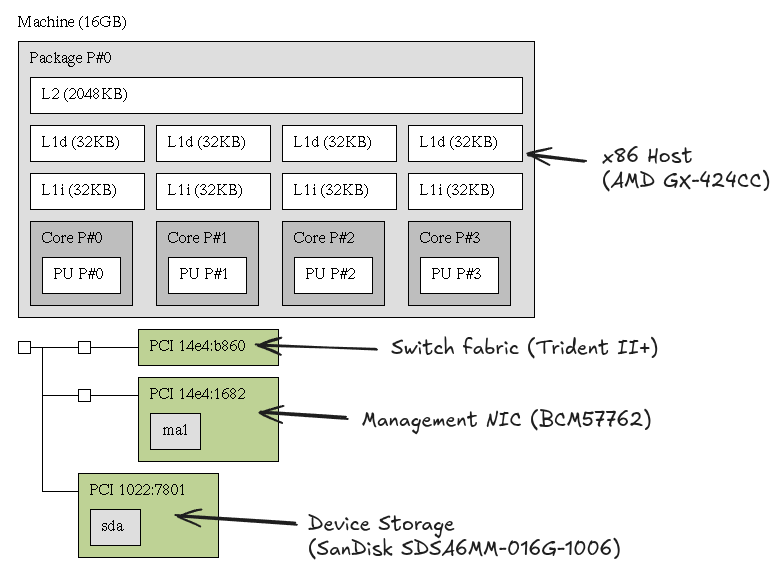
From the perspective of hardware, the control plane of a network switch typically isn't complicated. In loose terms, the switch fabric is an extremely large - and expensive - chunk of silicon grafted onto the side of a reasonably low-power server from the era.
Arista's devices are built atop a Linux base with kernel modules and userspace extensions. While a traditional CLI is available, some operations inside of the base Linux system will be copied into the ASIC. For example, if an IPv4 or IPv6 route is inserted into the kernel, it'll be interpreted by Arista as a kernel sourced route (with a 'K' route origin in show route) and will be offloaded into hardware. As a result, running alternative routing daemons (such as BIRD) on Arista hardware is quite trivial!
When I first acquired the hardware, I quickly took advantage of Arista's generous functionality - I've built considerable infrastructure around BIRD, non-SNMP provided metrics, and the ability to monitor system health like any other server.
Unfortunately, the open and seemingly accessible nature of Arista's hardware can act almost like vendor lock-in, as no other vendors that I could find have built such an extensive ecosystem around supporting third party, off-the-shelf daemons on their hardware. So what other options are there?
Whitebox switching
Some years ago, hyperscalers started to build their own switches. These devices (generally) didn't ship with bespoke ASICs, instead opting for an in-house software implementation running against existing silicon. While this shifted the burden of building and maintaining a NOS onto the hyperscalers, it simultaneously enabled them to control the underlying software running inside their NOS. Gone were the days of long-standing software bugs that a vendor refused to fix, replaced instead with bespoke control planes that made configuring switches feel more like interacting with a generic microservice.
The trend didn't stay internal. Publicly available, non-vendor developed NOSes began to pop up, notably including SONiC and DENT.
SONiC was originally developed by Microsoft and utilizes ASIC-specific, typically black-box blobs to support each individual vendor/SKU it runs on; as a result, support is largely limited by which vendors (or vendor licensees) have taken the time to develop the magic binary. While it's got support for my existing hardware, it's got one major problem: like many open source projects, support for various functionality is heavily dependent on individual need. It's quite evident that Microsoft had a need for Layer 3 functionality, while Layer 2 functionality has been spotty and prone to de-syncronization on all hardware I've used it on. Additionally, some functionality - like IP route insertion from the kernel - isn't available.
In contrast to SONiC, DENT does not take advantage of a project-specific abstraction layer; instead, it acts as a NOS-like interface on top of a generalized, vendor-provided, kernel level abstraction layer called switchdev.
Switchdev offloads familiar Linux functionality into the ASIC. Like Arista, functionality exists to copy IPv4 / IPv6 routes. Unlike Arista, additional common functionality - such as ACLs and gathering of interface metrics - can be performed via standard tooling. DENT is functionally a pre-built, NOS-like set of tools built to manage a Linux host.
While DENT itself didn't offer the exact tooling I was after, switchdev presented an opportunity.
Selecting the hardware
DENT - and by extension switchdev - has a relatively small supported hardware list. Looking down the list, we see three major ASIC families that have some form of switchdev support: Marvell's Alleycat3, Marvell's Aldrin 2, and Mellanox's Spectrum. After a bit of research, I managed to pick up a Mellanox SN2010 - a Spectrum-based, switchdev-supporting chassis - for relatively cheap.
Opening it up, we see a fairly simple layout:
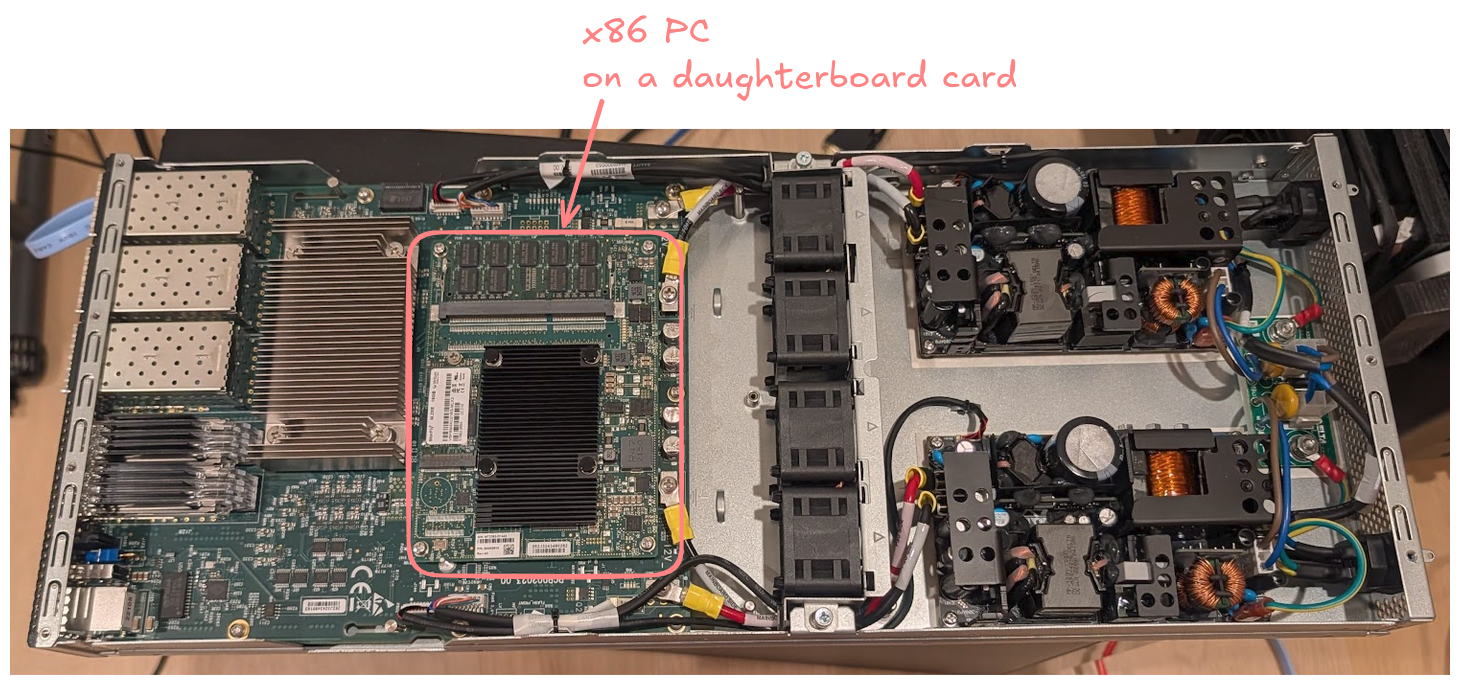
The concept of a "small PC that grew an ASIC" is fairly obvious; the computer itself is a tiny daughterboard!
In addition to the switching hardware, the chassis contains two unshielded power supplies and 4 internal fans. If you'd rather have the opposite direction of airflow, the fans can be turned around with three screws in a few minutes - not bad for a fully internal config.
Apart from the front panel SFP/QSFP ports, the device has 3 administrative ports: a RS232 serial port, a RJ45 Intel gigabit interface, and a USB port. The serial port outputs at a default baud rate of 115200, though the bios can only accept input keyboard input over USB.
Starting it up, pressing F7 and entering the bios password 'admin', we're dropped into a fairly standard AMI bios:
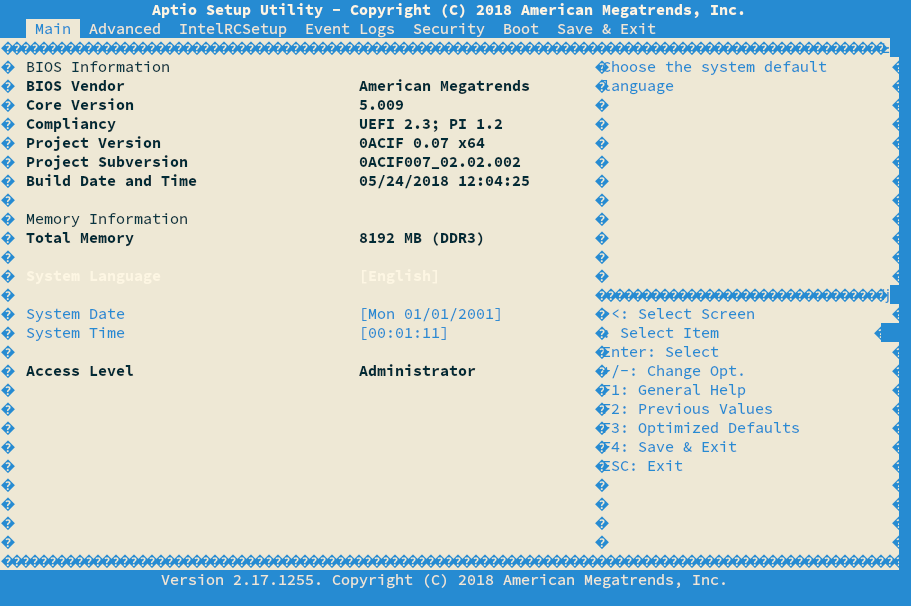
From here, we can set the default boot device to USB, swap the keyboard for a Debian installer, and reboot. Once we're at GRUB, keyboard input over serial starts to work, allowing us to boot into a serial-enabled Debian installer (by appending 'console=tty0 console=ttyS0,115200' to boot options in GRUB) and install Debian to the internal SSD. Once at a normal debian shell, we notice we're missing our interfaces:
igloo@core02:~$ ip a
1: lo: <LOOPBACK,UP,LOWER_UP> mtu 65536 qdisc noqueue state UNKNOWN group default qlen 1000
    link/loopback 00:00:00:00:00:00 brd 00:00:00:00:00:00
    inet 127.0.0.1/8 scope host lo
       valid_lft forever preferred_lft forever
    inet6 ::1/128 scope host noprefixroute
       valid_lft forever preferred_lft forever
2: enp0s20f0: <BROADCAST,MULTICAST,UP,LOWER_UP> mtu 1500 qdisc mq state UP group default qlen 1000
    link/ether XX:XX:XX:XX:XX:XX brd ff:ff:ff:ff:ff:ff
    inet6 fe80::XXXX:XXXX:XXXX:XXXX/64 scope link proto kernel_ll
       valid_lft forever preferred_lft forever
While Mellanox's switchdev implementation, mlxsw, has been upstreamed, it's not enabled by default on most kernel builds. To fix it, we'll need to enable the kernel options, build our kernel, then install the kernel on the device. Fortunately, mlxsw's documentation provides the exact list for us:
The default interface names are not trivially parseable. Referencing Pin van Pelt's guide to Spectrum hardware, we can solve the issue with a udev rule:
igloo@core02:~$ cat /etc/udev/rules.d/10-local.rules
SUBSYSTEM=="net", ACTION=="add", DRIVERS=="mlxsw_spectrum*", NAME="sw$attr{phys_port_name}"
Following a reboot, we're dropped into mostly standard Debian, ready to build our new router.
L1 Interfaces
I've got a lot of breakout cables that take a single QSFP interface and break them out into 4x SFP+ interfaces that can be used by hosts within my network. Given I'd like to avoid buying new cables, we can re-configure individual switchports for breakout cables via devlink:
/sbin/devlink port split $(/sbin/devlink port show | grep swp22 | cut -d " " -f 1 | cut -d ":" -f 1,2,3) count 4
We can confirm the port has been broken out successfully via ethtool:
L2 & L3 Interfaces
On a traditional Debian host, one is spoiled for choice when deciding on tools for managing network interfaces. I've historically used systemd-networkd, so I reached for the familiar thing.
systemd-networkd's configuration is verbose. For any operation at scale, I'd recommend either building a template-based config build system or to select something other than systemd-networkd, as one can quickly create a lot of config files:
igloo@core02:/etc/systemd/network$ ls -la | wc -l
83
That said, a basic configuration is relatively straightforward. Once systemd-networkd is installed, we need to define a bridge:
A device for each vlan:
Attach each vlan to the bridge:
Define each physical port, then attach the vlans we want:
And finally, configure the L3 interface for each vlan:
On reload, systemd-networkd will configure the interfaces, which in turn will load them into the ASIC:
igloo@core02:/etc/systemd/network$ sudo bridge vlan show
port              vlan-id
swp20s0           304 PVID Egress Untagged
igloo@core02:/etc/systemd/network$ sudo ifconfig vlan304
vlan304: flags=4163<UP,BROADCAST,RUNNING,MULTICAST>  mtu 1500
        inet6 fe80::XXXX:XXXX:XXXX:XXXX  prefixlen 64  scopeid 0x20<link>
        inet6 2a0X:XXXX:XXXX:XXXX::1  prefixlen 64  scopeid 0x0<global>
        ether XX:XX:XX:XX:XX:XX  txqueuelen 1000  (Ethernet)
        RX packets 0  bytes 0 (0.0 B)
        RX errors 0  dropped 0  overruns 0  frame 0
        TX packets 30384  bytes 4038796 (3.8 MiB)
        TX errors 0  dropped 2 overruns 0  carrier 0  collisions 0
Routing
When a route is installed into the kernel, mlxsw will attempt to offload it into the ASIC. When it's successful, the route will be flagged as offloaded:
igloo@core02:~$ ip route show 1.1.1.0/24
1.1.1.0/24 via XXX.XXX.XXX.XXX dev XXXXX proto bird src XXX.XXX.XXX.XXX metric 32 offload rt_offload
Unfortunately, Spectrum 1 is not well suited to natively handling multiple full internet routing tables. The default mlxsw resource allocation gives us room to support 94,208 IPv4 and IPv6 routes. Given that, at the time of writing, the full table is ~1.04 million routes on IPv4 / ~234k on IPv6, we can't fit one table, let alone the several we'd ideally want to.
Fortunately, we don't have to. There are a few things we can do to make this work -
Re-allocating resources
Spectrum 1 can re-allocate resources to better support additional routes. In doing so, we sacrifice the total number of ECMP groups, next hops, and routes more specific than an IPv6 /64. Fortunately, I don't need the thousands of each it allocates for them by default, so I can afford to spend the memory on routes.
Re-allocating wins us an increase to 221184 routes. An improvement, but not significant enough.
ECMP'ing the default
I've got 2 transit connections and access to the local internet exchange. While it's important to have global network reachability, localized connectivity (ex. to local CDN providers, various home ISPs, etc…) represents the bulk of my network flow. As a result, only a portion of the millions of routes we'll receive is likely to matter.
Thus, we can elect to multipath our default route (0.0.0.0/0) via each transit, with more specific overrides for networks we particularly care about or which are available on the local internet exchange:
export filter {
    # Accept networks that have been given priority
    transit_kernel_override();

    # Accept local IX-learned routes
    accept_ix_routes();

    # Reject everything else
    reject;
};
Doing so gets us down to 161k routes (IPv4 + IPv6). While that's under our 221k limit, given long-term table growth, it's not a lot of runway.
Route compression
Today's routing table is not very efficient. Consider the following hypothetical route entries:
192.168.0.0/24 via 192.0.2.1, announced by AS64496
192.168.1.0/24 via 192.0.2.1, announced by AS64497
192.168.2.0/24 via 192.0.2.1, announced by AS64498
192.168.3.0/24 via 192.0.2.1, announced by AS64499
Each entry takes up one slot in the ASIC, consuming 4 total slots. Yet the same forwarding result could be achieved by a single route:
192.168.0.0/22 via 192.0.2.1
While the route does not accurately demonstrate the source ASN, the AS path, etc…, that information is ultimately irrelevant to where we are going to send packets, which is all that the ASIC cares about. Thus, we can track the full tables inside of the control plane's memory (which is comparatively plentiful) and opt to insert only an aggregated route table.
BIRD has native aggregation functionality, but it only allows for aggregation on equivalent prefixes, leading me to create a basic route compressor in golang. To do so, I needed to export all routes, compress them, then get it back into the kernel. For ease-of-change reasons, I'd prefer to have BIRD control all routes that go into the kernel, so the route path needs to be BIRD -> Compressor -> BIRD -> Kernel.
There are two easy ways to get data out of BIRD: via separate kernel routing tables or via a routing protocol. After trying both, I eventually settled on establishing BGP sessions from BIRD to the compressor.
While BIRD does not allow sessions to be established over loopback, one can circumvent the issue through a dummy device:
sudo ip link add dummy0 type dummy
sudo ip link set dummy0 up
sudo ip addr add 10.20.20.1/32 dev dummy0
sudo ip addr add 10.20.20.2/32 dev dummy0
Compression eliminates ~136k redundant routes:
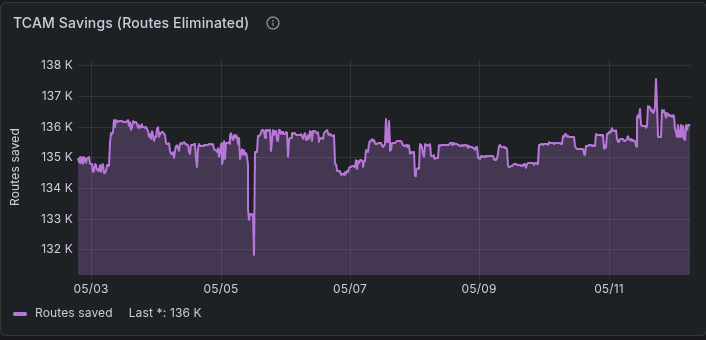
The final result (including non-compression eligible routes) is ~92k routes in ASIC - plenty of runway to grow.
ACLs
ACLs on mlxsw are handled via TC, tooling normally designed for kernel-side traffic control. It's no UFW or iptables, but it's still flexible enough to get the job of a router ACL done.
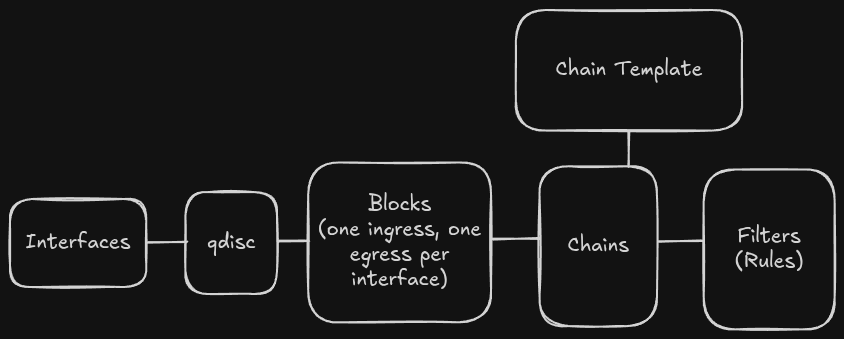
If you squint, the concepts are similar to iptables. Filters (rules) are entered into chains which are optionally contained inside of blocks. Blocks or chains are then attached to interfaces via a classifier (clsact) qdisc, resulting in their rules being enforced on the individual interface.
Because we're installing TC rules into silicon, we need to be careful about our resource utilization. We've got a few methods to help reduce usage:
-
Blocks: rather than re-creating chains (and filters/rules) on a per-interface basis, we can instead place chains inside of a block, which can then be applied to multiple ports. For example:
# At system start - assign each port to ingress block 10 / egress block 11 {%- for port in switch_public_facing_ports %} sudo tc qdisc add dev {{ port }} ingress_block 10 egress_block 11 clsact {%- endfor %} # Then, when adding rules, specify the block sudo tc filter add block 10 chain 0 protocol arp pref 111 flower action pass sudo tc filter add block 11 chain 0 protocol arp pref 111 flower action pass -
Chain templates: by telling mlxsw what the format of the rule is (ex. match on tcp port and IPv4 /24, nothing else), we can enable mlxsw to only reserve enough memory for the rules we'll actually use. For example:
# Filter egress routes to only allow prefixes we route out to the public internet
# Rules matching must be IPv6 routes shorter than or equal to a /48
sudo tc chain add block 11 egress proto ipv6 chain 80 flower src_ip ::/48
sudo tc filter add block 11 chain 80 egress pref 30 prot ipv6 flower src_ip 2a0X:XXXX::/32 action pass
In addition to the usual accept (pass) and drop actions, we've got a few other noteworthy capabilities:
- goto: Jump from one chain to another. All traffic initially enters the clsact qdisc and executes from chain 0. While it's useful to place some rules here, for chain templating reasons, we'll need to process against other chains. There is no 'fall through' behavior: if a packet isn't forwarded (pass), mirrored, or sent to another chain via goto, it'll be dropped when processing reaches the end of chain 0.
- trap: rather than processing a packet in the ASIC, send the packet to the control plane for processing. The Intel Atom driving the SN2010 isn't well suited for this, so it's usually best to avoid it, but if we want to pcap a flow, trapping it to the CPU will enable us to do so.
- pedit: Editing packet headers. We're only able to edit specific headers (TOS on Spectrum, IPv4/IPv6 addresses and TCP/UDP ports on Spectrum-2 and above).
- vlan modify: Modify the VLAN ID of a received packet
- police: The action you'd usually expect from a queueing system - the ability to apply rate limits.
Not all TC actions can be offloaded. When an action is offloaded, it'll be marked with the in_hw flag:
When developing TC rules, it's important to ensure everything is marked as in_hw. mlxsw isn't particularly flexible - small things can easily cause rules to not be installed in hardware, quietly causing them to be irrelevant for most packet processing.
Egress Control
Ingress control (i.e. the path packets take into the network from the global internet) can be accomplished with a combination of BGP communities, export controls, and AS prepends - the usual traffic management strategies aren't any different here. In contrast, egress control without re-configuring the router (i.e. controlling what path packets take into the global internet from the local network) is a bit more complicated.
On the Arista, I took advantage of an ACL match to force packets out a specific next hop:
ipv6 access-list 6-he-transit-pbr-out
   10 permit ipv6 any any dscp af11
…
class-map type pbr match-any 4-he-pbr-out
  10 match ip access-group 4-he-transit-pbr-out
…
policy-map type pbr dscp-to-specific-port-2
  10 class 4-he-pbr-out
     set nexthop XXX.XXX.XXX.XXX
Any client that wanted to force traffic out of Hurricane Electric simply needed to attach the DSCP value of AF11 to a packet. No direct equivalent exists under mlxsw, though there's an even better option: VLAN re-writes.
First, define additional routing tables for each transit we want users to be able to force traffic across:
igloo@core02:/$ cat /etc/iproute2/rt_tables
255 local
254 main
253 default
0 unspec
11 he
Next, define a new VLAN for each transit we want users to be able to force traffic across. Attach it to all user facing ports and the transit port as a tagged port:
To ensure the table populates cleanly at boot (i.e. before BIRD comes up), attach static default routes in the new table to the transit interface itself:
igloo@core02:/etc/systemd/network$ cat 80-he-transit.network | grep Route -A4
[Route]
Destination=::/0
Gateway=XXXX:XXXX:XXXX:XXXX:XXXX:XXXX:XXXX:XXXX
GatewayOnLink=true
Table=11
Add an ACL rule to match the DSCP value. When a packet matches, use pedit to remove the DSCP value and re-write the VLAN:
# HE / AF11 (DSCP 10 = TOS 0x28) -> VID 939
tc filter add block 20 chain 50 ingress protocol ip prio 100 \
    flower ip_tos 0x28/0xfc skip_sw \
    action pedit ex munge ip dsfield set 0x00 retain 0xfc pipe \
    action vlan modify id 939
Finally, use BIRD to copy local routes into the new table. Unlike the Arista trick, we're able to have multiple routes when we match - not just the default - and I'd like to keep any traffic accidentally tagged local.
Any packets sent with the DSCP value will now be re-routed over a different link:
Metrics
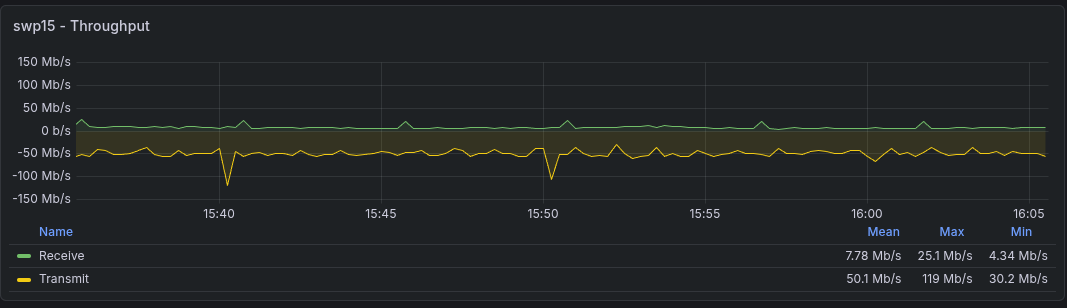
Like with Arista hardware, one can run familiar, off-the-shelf system monitoring tools to measure the health of the control plane itself (ex. Node Exporter). Due to switchdev's integration with the kernel, most dataplane metrics (ex. datarate of an interface) just work!
Flow data can be acquired via hsflowd. While it's got an option to configure the ports it collects on, it assumes that it'll be operating in a chain directly attached to the interface, which isn't compatible with pre-existing TC blocks. Fortunately, it works just as well with the flag turned off and the rules manually added to our blocks:
igloo@core02:/etc/systemd/network$ cat /etc/hsflowd/config.yaml
sflow {
  sampling.10G=10000
  collector { ip=XXX.XXX.XXX.XXX UDPPort=6343 }
  psample { group=1 egress=on }
#  dent { sw=on switchport=swp5 }
# dent module is broken with how we do acls, instead use
# sudo tc filter add block 10 ingress pref 50 matchall action sample rate 1024 group 1 trunc 128
}
The ASIC itself has some resources that could plausibly become exhausted. To ensure we alarm if it happens, we can write a basic exporter to pull devlink metrics and to present them in a prometheus-friendly format:
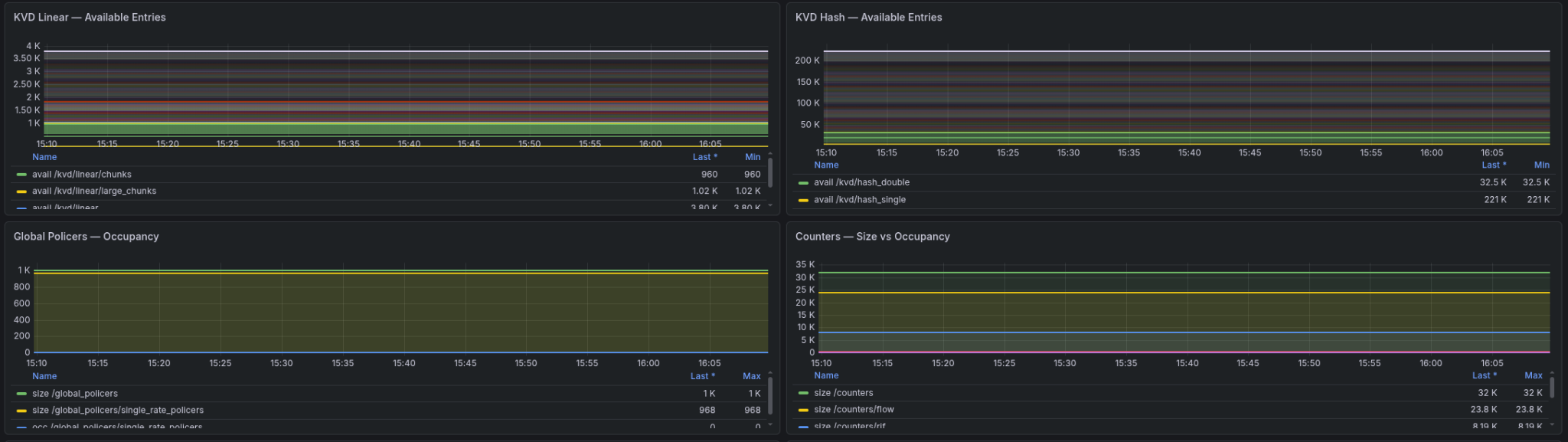
Additional daemons (ex. BIRD) have their own exporters; we're able to pull metrics directly from them.
System Updates & Maintenance
Since all tooling is either maintained upstream or derived from code I've written, long term maintenance is comparatively easy. I'm able to use my choice of config management tooling (ex. Ansible, Salt, Chef, etc…) directly on the host without any bridge software. While I'm responsible for maintaining my code, everything else updates with Debian mainline.
As if to prompt demonstration, while I was in the middle of writing this, Copy Fail (CVE-2026-31431) and Dirty Frag (CVE-2026-43500 & CVE-2026-43284) were revealed. While it'd be possible to patch the router's immediate vulnerability without the kernel update, I was able to trivially update to Debian's patch -
igloo@core02:~$ uname -r
6.12.86
Thanks
Thank you to Pim van Pelt for providing an excellent getting started guide for the Spectrum platform. Additionally, thank you to Basil Fillan, Zoey Mertes and Ben Cartwright-Cox - the later of whom has his own article on the platform - for helping brainstorm and work around many of the problems I encountered on this journey.
Finally, I want to shout out the authors of the mlxsw wiki. It's a fantastic set of documentation that provides enough real-world examples for someone to quickly pick it up and go.